
Capsule, a lightweight context layer for work across the web
Capsule in Chrome lets people collect relevant webpages, excerpts, files, and notes into one temporary context set, then bring that context into an AI tool without repeatedly copying, uploading, and switching between tabs.
TIMELINE
Sprint
TEAM
Individual
ROLE
Product Designer
FOCUS
AI Product
Browser Systems
Interaction Design
AI Prototyping
THE PREMISE
Gathering context for AI is still a fragmented process
The context behind a single prompt rarely lives in one place. It may include a webpage in one tab, a selected passage in another, an image saved locally, a PDF in Downloads, or a note captured somewhere along the way. Today, bringing those materials into any AI tools often means handling them one at a time:
Copy a link. Switch tabs. Paste it.
Find an image. Upload it.
Return to the browser. Copy an excerpt.
Locate a PDF. Attach it.
Then write the prompt.
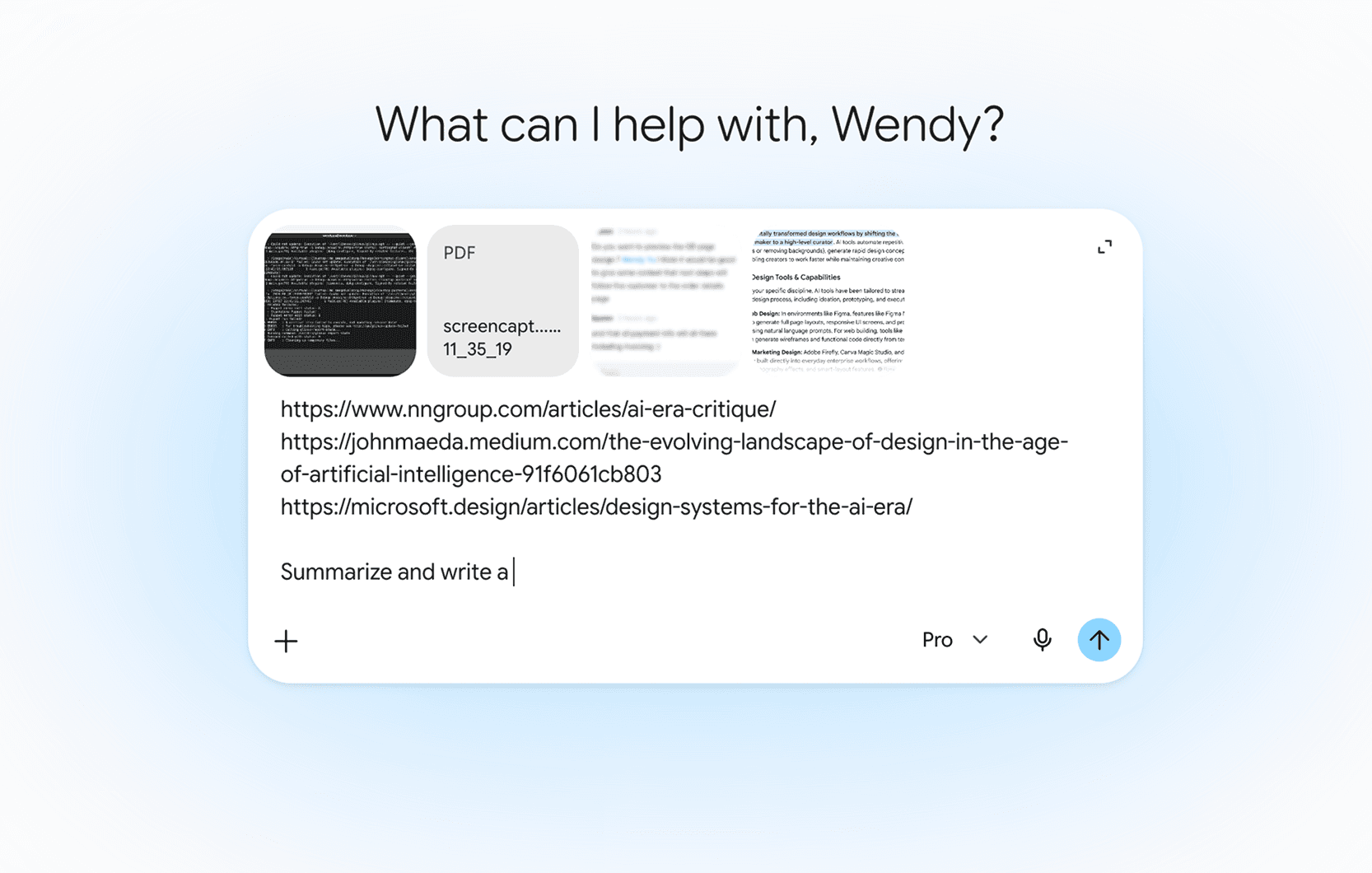
Each action is simple on its own, but together they create a disjointed workflow.
Key tensions
Fragmented
Relevant material is spread across browser tabs, local files, and web applications.
Interruptive
Every new source creates another detour away from the current task.
Hard to track
Users must remember what has already been added and what is still missing.
What if people could collect context while they browse, and bring it into an AI conversation all at once?
THE OPPORTUNITY
Turning scattered context into one portable browser object
I explored this opportunity through Capsule, a Chrome concept designed to work across Gemini and Google Workspace.

SYSTEM OVERVIEW
Collect, inspect, and carry
01 Collect
Add tabs, selected passages, files, and images while browsing.
02 Inspect
Review exactly what has been included in a compact popup.
03 Carry
Attach the Capsule to Gemini in the browser or within Google Workspace.
DESIGN BREAKDOWN
Moment 1: Capturing context without breaking flow
Drag the current tab into Capsule
For fast capture, users can hold Option or Alt and drag the active tab directly into Capsule.
Add current tab from the popup
The same action is available through the popup for users who prefer an explicit, keyboard-accessible path. Both interactions add the same page context.
Moment 2: Saving only what matters
Entire pages often contain much more information than Gemini needs. Capsule lets users save a specific passage together with its source.
Designing the Capsule object
I designed Capsule as an popup card rather than a persistent side panel. Capsule is a utility, not a destination: users should be able to inspect context quickly and return to the page they were working on.

Moment 3: Managing the current Capsule
The Capsule can evolve with the task. Users can rename it as the context changes and explicitly clear it when the work is complete. It never clears automatically after being used with Gemini.
Rename
Clear
Moment 4: Bringing Capsule into Gemini
Selecting Use in Gemini opens Gemini with the current Capsule already attached. The prompt remains empty so the user stays in control of what happens next. Before sending, users can inspect the Capsule and temporarily exclude individual items from the current prompt.
Moment 5: Working inside Google Workspace
Capsule follows Gemini into the tools where work happens.
FUTURE OPPORTUNITIES
Extending Capsule beyond the current task
Support multiple Capsules
For this first iteration, Capsule focuses on one active context set at a time. Future iterations could consider saved and reusable Capsules.
Shared context for teams
A Capsule could be shared with collaborators as an orientation layer for a project.
REFLECTIONS
This sprint began with a broader idea about carrying intent across applications. As I developed the concept, I realized that the strongest and most believable opportunity was much narrower: helping users assemble context before they prompt an AI. That shift changed the project from an agentic system into a focused browser utility.
I used AI-assisted coding to build the concept as an interactive system rather than a sequence of static mockups. It was exciting to move so quickly between product thinking and implementation: I could describe an interaction, test it in the prototype, notice where the mental model broke down, and revise both the design and code in the same cycle. Seeing Capsule actually come to life through the coded prototype also helped me evaluate transitions, states, and cross-surface behaviors that would have been difficult to judge in static screens alone.
I’m especially happy that the final concept feels lightweight, even though the system behind it is not. Capsule connects browsing, collection, review, transfer, and prompting into one continuous experience while keeping users in control of what is included and what happens next.